


 AnyMP4 Blu-ray Copy Platinum 7.2.98 Multilingual
AnyMP4 Blu-ray Copy Platinum 7.2.98 Multilingual
File size: 29 MB
AnyMP4 Blu-ray Copy Platinum, the excellent and full-featured Blu-ray software, has the most advanced copy and burning technology to help users copy any Blu-ray disc (2D/3D) to Blu-ray disc/ folder/ ISO image files. This fantastic Blu-ray Copy software makes perfect 1:1 ratio clone, even supports compressing BD-50 to a single BD-25 with absolutely faultless performance. It's definitely the right solution for making backups of Blu-ray movies and has been proven to be a trustworthy tool by millions of users.
• Copy Blu-ray discs to Blu-ray, and fully support Blu-ray 3D
• Backup Blu-ray disc to PC local hard drive without any hassles
• Rip Blu-ray disc from any Blu-ray folder and Blu-ray ISO image files
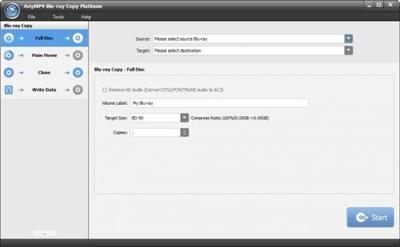
• Flexible BD copy modes like "Full Disc", "Main movie", "Clone", and "Write Data"
• 100% Original-Quality and ultrafast burning speed
Key Features
Copy any Blu-ray disc/folder/ISO image files
• Copy Blu-ray to Blu-ray disc
With the world leading Blu-ray to Blu-ray Copy Software, users can easily copy Blu- ray disc and Blu-ray 3D to a new blank Blu-ray disc in super fast copying speed. Even users can compress BD-50 to a single BD-25 with magic video and image effect.
• Rip Blu-ray disc from Blu-ray folder/ISO image file
The first-rank Blu-ray Copying Software is capable of ripping Blu-ray movies from Blu-ray folder and Blu-ray ISO image files with super excellent Blu ray quality.
• Backup Blu-ray to hard drive effortlessly
To avoid Blu-ray disc loss and damage, the foremost Blu-ray Backup software has the ability to backup any Blu-ray disc to Blu-ray movies, thus any favorite Blu-ray movie can be saved on your PC local hard drive. Guarantee absolute safety!
Choose right copy mode for your Blu-ray
• Choose "Full Disc" to copy full Blu-ray
If you want to copy the whole Blu ray content, you can select "Full Disc" mode to copy Blu-ray movie with ZERO file and content loss.
• Select "Main movie" to rip the longest movie
Copies the main movie of the original Blu-ray discs/folder/ISO files with additional content and special features omitted.
• Copy full Blu-ray disc with "Clone" copy mode
AnyMP4 Blu-ray Copy makes perfect 1:1 ratio clone with the most advanced clone technology and 6X faster copy speed.
• Choose "Write Data" to copy Blu-ray folder
Copying Blu-ray folder to Blu-ray disc or Blu-ray ISO image file at blazing-fast speed.
Convenient and easy-to-use
• Magic preview feature to view the main movie
This wonderful Copying Blu-ray software allows users to preview the main movie effect with the "built-in" player.
• Choose your favorite audio and subtitle stream
In the "Main movie" column, you can select the audio and subtitle stream for the main movie when compressing BD-50 to BD-25.
• Ultra-intuitive user experience
The versatile Blu-ray Copy is easy to use even for beginners with an ultra-intuitive interface and user-friendly design. For more experienced users, it has the power to customize the copy experience.
Whats New
Updates: official site does not provide any info about changes in this version
rapidgator.net:
Contenido oculto. Ha de estar registrado, y pulsar el botón "Gracias" para visualizar sus enlaces de descarga.
Si trás registrarse todavía no visualiza el botón de "gracias", pulse la tecla F5, para refrescar la página.
*********.com:
Contenido oculto. Ha de estar registrado, y pulsar el botón "Gracias" para visualizar sus enlaces de descarga.
Si trás registrarse todavía no visualiza el botón de "gracias", pulse la tecla F5, para refrescar la página.
nitroflare.com:
Contenido oculto. Ha de estar registrado, y pulsar el botón "Gracias" para visualizar sus enlaces de descarga.
Si trás registrarse todavía no visualiza el botón de "gracias", pulse la tecla F5, para refrescar la página.
1dl.net:
Contenido oculto. Ha de estar registrado, y pulsar el botón "Gracias" para visualizar sus enlaces de descarga.
Si trás registrarse todavía no visualiza el botón de "gracias", pulse la tecla F5, para refrescar la página.

 Citar
Citar
